No-code conversational AI lets a company build chatbots and AI agents that talk with customers and employees without writing code. The person who knows the questions customers ask, usually someone in customer care, marketing or HR, designs the conversation in a visual editor, connects the company documents and publishes the assistant on the website or on WhatsApp. Developers step in only for the integrations that really need them.
This matters most for small and mid-sized companies. In Italy, according to the Politecnico di Milano AI Observatory, 71% of large enterprises have at least one AI project running, against 8% of SMEs. The gap is rarely about interest. It is about the cost of a development team, and that is exactly the cost no-code removes.
In this guide you will find what no-code conversational AI is today, how it differs from low-code and traditional development, where it works well, how to build your first assistant step by step, where its limits are and how to choose a platform.
Table of contents
- What is no-code conversational AI?
- No-code, low-code and pro-code: the differences
- The no-code conversational AI market
- Use cases: where no-code conversational AI is applied
- How to create a chatbot or AI agent without code
- Limits of no-code: when you need a developer
- How to choose a no-code conversational AI platform
- Where to start
- FAQ about no-code conversational AI
What is no-code conversational AI?
No-code conversational AI is a set of tools for creating and managing chatbots, virtual assistants and AI agents through a graphical interface: drag-and-drop editors, templates, forms for entering questions and answers, and ready-made connectors to channels such as websites, WhatsApp, Messenger and mobile apps. Everything that used to require a developer, from intent recognition to channel publishing, is handled by the platform.
What has changed in the last two years is the engine underneath. The first no-code chatbots were rule-based: you drew a decision tree, and the bot followed it. If the user wrote something the designer had not foreseen, the conversation got stuck. Today the same visual tools sit on top of large language models (LLMs) such as GPT, Claude or Gemini, which understand free-form questions and write natural answers. With RAG (Retrieval-Augmented Generation) the model answers from your own documents (manuals, price lists, policies) instead of from its general knowledge, which keeps answers accurate and up to date. If you want to go deeper, our complete guide to RAG explains how it works.
The result is that "no-code chatbot" now often means no-code AI agent: an assistant that understands the request, looks up the right information, and can also act, for example by opening a ticket, booking an appointment or updating a record in the CRM. We cover the difference between the two in detail in the article on how to create AI agents.
No-code, low-code and pro-code: the differences
The three terms describe how much code a project needs, and therefore who can build it. They are not rival technologies: many companies use all three, each for a different part of the work.
| No-code | Low-code | Pro-code | |
|---|---|---|---|
| Who builds | Business teams (customer care, marketing, HR) | Business teams plus a technical profile | Development team |
| Time to first version | Days | Weeks | Months |
| Flexibility | High within what the platform allows | High, with custom scripts | Unlimited |
| Maintenance | Done by the business team | Shared | Done by IT |
| When to choose it | FAQ, support, lead generation, booking, internal help desk | Projects with specific integrations or logic | Products where the assistant is the core business |
For most conversational projects the right starting point is no-code. A customer care assistant that answers questions about orders, returns and opening hours does not need custom code, and it changes every week: new products, new policies, new promotions. If every change requires a developer, the assistant ages quickly. When the person who owns the content can update it directly, it stays accurate.
The no-code conversational AI market
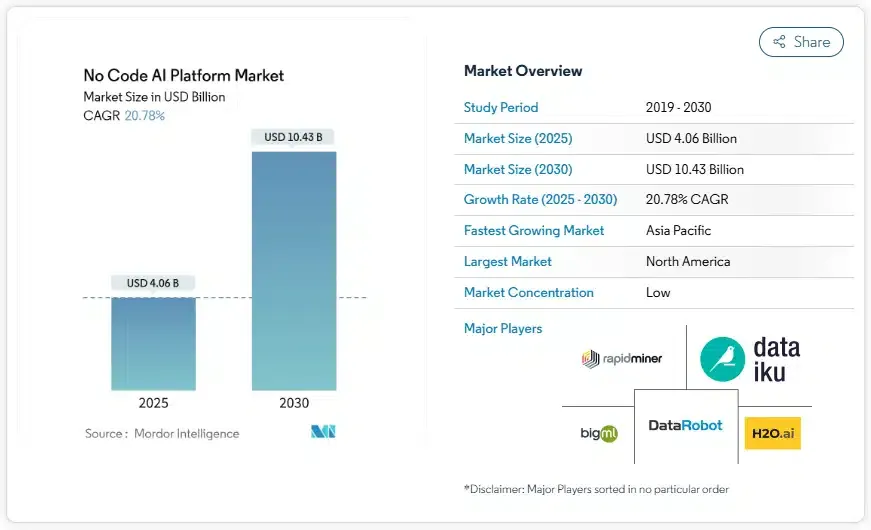
The numbers confirm the trend. According to the Global No-code AI Platform Market report by Value Market Research, published in February 2026, the global market for no-code AI platforms was worth $7.33 billion and is expected to reach $82.84 billion by 2034, with a compound annual growth rate of 30.92%. Estimates from different analysts vary because each defines the market differently, but they all point in the same direction: more and more companies want to use AI without hiring a development team to do it.
Italy shows the same pattern from another angle. The Politecnico di Milano AI Observatory, presented in February 2026, measured an Italian AI market worth €1.8 billion, up 50% in a year. Growth, however, is concentrated in large companies: 71% of them have at least one AI project, compared with 8% of SMEs. A small company with a ten-person customer service team cannot justify a six-month development project. It can, however, spend a few days configuring an assistant on a no-code platform and see whether it reduces repetitive requests.
Use cases: where no-code conversational AI is applied
No-code conversational AI works best where conversations are frequent, fairly repetitive and based on information that the company already has in writing. Some examples follow.
Customer service
This is the most common case. The assistant answers questions about orders, deliveries, returns and opening hours 24 hours a day, and passes the conversation to a human operator when the request is complex or the customer asks for it. A good starting point is to take the hundred most frequent questions from support tickets: in many companies they cover most of the incoming volume. We discuss this in more depth in the article on AI agents in customer service.
Sales and marketing
On a website or in a WhatsApp campaign, the assistant asks the visitor a few qualifying questions (company size, budget, timing), recommends the right product and books a call with a salesperson only for qualified leads. WhatsApp deserves a mention of its own, because open rates are much higher than email: here is our guide to the WhatsApp chatbot for business.
Human resources
In recruiting, the assistant answers candidates' questions, collects CVs and schedules interviews. Internally, it answers employees about leave, expense reports and company policies, taking the answers from the HR handbook instead of from the HR team's inbox.
Healthcare
Clinics and medical centres use it to book and move appointments, give information on services and preparation for exams, and handle a first triage that sends the patient to the right department. Here the passage to a human operator must be fast and clear.
Travel and hospitality
Hotels, travel agencies and tour operators use it to answer before booking (availability, prices, services), to assist travellers during the stay, and to handle changes and payments in several languages.
How to create a chatbot or AI agent without code
Building a no-code conversational assistant is a short project, but it is still a project. These are the steps we see working in practice:
- Choose one goal. Not "improve customer experience", but something measurable: answer questions about order status, qualify website leads, book appointments. One assistant with one clear job is better than a generic one.
- Collect the knowledge. Gather the documents the assistant must know: FAQ, product sheets, policies, price lists. With RAG these become the knowledge base the agent reads from. The quality of the answers depends on the quality of these documents far more than on the model.
- Design the conversation. Write the system prompt (tone, what to answer, what to refuse), add exact answers for questions that must always get the same reply, such as legal or price information, and draw visual flows for guided steps like a booking.
- Connect channels and systems. Publish the assistant on the website, WhatsApp or other channels, and connect it to the CRM or ticketing system with webhooks or ready-made connectors.
- Plan the handover. Decide when the conversation moves to a person: on explicit request, after two failed answers, or for specific topics such as complaints. A customer who cannot reach a human leaves angrier than before.
- Test with real questions. Before going live, use real questions from past tickets, including the badly written ones. That is where weaknesses come out.
- Monitor and improve. Read conversation transcripts every week for the first month, add missing content and correct wrong answers.
For a more detailed walkthrough, see our guide on how to create a chatbot.
Limits of no-code: when you need a developer
No-code covers most conversational projects, but not all of them. It is better to know the limits before starting than to discover them halfway.
The first limit is integrations. Connecting the assistant to a modern CRM with a ready-made connector takes minutes. Connecting it to a fifteen-year-old management system without APIs is a development project, whatever platform you choose. In these cases the right setup is mixed: the business team manages content and conversations, and a developer builds the one integration that is missing, exposing it to the agent as a tool.
The second limit is governance. If anyone can create an assistant, someone must decide which ones go online, which data they can read and who checks their answers. Without these rules a company ends up with ten assistants giving ten different answers to the same question.
The third is compliance. Under the EU AI Act, the transparency obligations apply from August 2026: users must know they are talking to an AI system. Personal data are also subject to GDPR. A no-code platform does not exempt you from these rules, but a good one makes them easier to respect, with data hosted in Europe, disclosure messages and access logs.
How to choose a no-code conversational AI platform
Comparing platforms on the list of features is of little use, because almost all of them claim the same ones. These questions are more useful:
- Can the team that owns the content update the assistant alone, without opening a ticket with IT?
- Does it support RAG on your documents, and can you see which source an answer came from?
- Can you choose or change the language model, or are you tied to one?
- Which channels does it support natively (web, WhatsApp, voice, social)?
- How does the handover to human operators work, and do operators see the full conversation?
- Where are the data stored, and how does it handle GDPR and the AI Act?
- How is it priced: per conversation, per message or by subscription?
For a broader comparison, read our guide on how to choose AI chatbot platforms. On costs, the article on how much a chatbot costs breaks down the total cost of ownership item by item.
Where to start
Do not start from the technology. Start from the conversation that costs you the most time today: the question your customer service answers fifty times a day, the lead form nobody follows up on, the candidate who writes to ask where the interview is. Build an assistant for that conversation only, measure for a month how many requests it handles without a human, then extend it.
Crafter.ai is a no-code platform for building enterprise AI agents: it combines LLMs, RAG on company documents, visual conversation flows and handover to human operators, with data hosted in Europe. You can see the plans on the pricing page.
FAQ about no-code conversational AI
What are the main types of chatbots?
There are four. Rule-based chatbots follow a fixed decision tree and work for simple FAQs or bookings. NLP chatbots recognise the user's intent even when it is phrased in different ways. Generative AI chatbots and AI agents use an LLM to understand free-form questions and write answers, often from company documents through RAG. Voice bots do the same over the phone or through voice assistants.
How much does it cost to implement a no-code chatbot?
It depends on volume, channels and integrations. The platform fee is usually the smallest item: the real costs are preparing the content and the time spent monitoring it in the first months. With pay-per-use pricing a small company pays only for the conversations it actually handles. We break down every item in the article on how much a chatbot costs.
Do I need developers to build an AI agent?
Not for most projects. A customer care or marketing team can build, publish and update an assistant on its own. You need a developer only for integrations with systems that have no API or ready-made connector.
Is no-code conversational AI secure and GDPR compliant?
It can be, but it depends on the platform. Check where data are stored (ideally in the EU), whether conversations are used to train third-party models, how long transcripts are kept and whether the assistant tells users they are talking to an AI, as the AI Act requires from August 2026.
Why choose a no-code conversational AI solution?
Because the people who know the customers can build and change the assistant themselves. That cuts development time from months to days, keeps answers up to date and lets you test an idea with a small budget before investing more.